AI Lab · Ideas
Agent Operation Flow
Package any multi-agent run as a shareable report: see what each agent was doing and how many output tokens each activity cost.
What it is
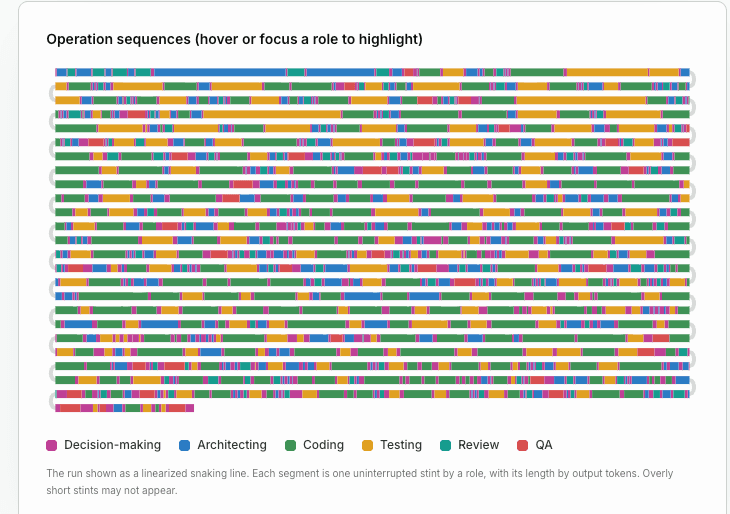
Agent Operation Flow turns cheap, structured stint records — one per block of focused activity — into an interactive, dark-theme report. Two linked views share one legend: a linearized Operation Sequence that snakes across alternating-direction lines (segment length ∝ output tokens), and a Fleet Output Budget showing where the fleet's output tokens went. Roles appear on the board only while the agent is actively working and has explicitly reported its status.
It is deliberately non-LLM: a harness hook measures tokens and duration, so the report never invents telemetry. Use it to monitor, audit, or demo a fleet, or to render osm/records.jsonl stints into a shareable visual.
How it works
1 · Record
The harness writes one atomic JSONL line per stint: agent id, role, task type, tokens in/out, duration and timestamps. Tokens are derived from real artifact size or command wall-clock — never hand-guessed.
2 · Aggregate
A passive reader filters by agent, classifies the current activity, and buckets the 11 task types (decision-making, architecting, coding, testing, review, QA, memory recall, tool use, invoke skill, split sub-agents, ask for permissions), summing tokens and time — pure I/O, no re-prompt.
3 · Report
The data is assigned to
window.OPS_DATAand rendered into the snaking Operation Sequence plus the Fleet Output Budget. The report always prints provenance and a SAMPLE / RECONSTRUCTED badge so measured vs synthetic is never ambiguous.
Live demonstration
Five agents collaborate on one product. Watch each register stints on the sequence as the project completes.
Now working
● Orchestrator — Define scope & acceptance criteria
Fleet output budget (live)
Live simulation of five agents. Each colored segment is one stint; its length is proportional to output tokens. Rows alternate direction and link via S-curve connectors — the canonical Operation Sequence from the agent-operation-flow skill.
Install the skill
The full, copyable skill definition — drop it into your own WorkBuddy skills folder.
---
name: agent-operation-flow
description: Monitor and visualize the operation sequences and output-token budgets of one or more agents/LLMs across 11 activity distributions (Decision-making, Architecting, Coding, Testing, Review, QA, Memory recall, Tool use, Invoke skill, Split Sub-agents, Ask for permissions). Use when visualizing task-type distribution over time, auditing per-role output-token spend across a fleet, or rendering lightweight stint records (from window.OPS_DATA or osm/records.jsonl) into an interactive dark-theme report with a linearized Operation Sequence snaking line and a Fleet Output Budget view. The snake flows across alternating-direction lines linked by smooth connectors, showing one continuous linked progression. Roles are shown on the board ONLY when the agent is actively working and has explicitly reported its status; otherwise they stay hidden.
agent_created: true
---

# Operation Sequence Monitor

## Overview

Visualize how agents (or any LLM fleet) spend their effort over time. The skill turns cheap, structured **stint records** — one per contiguous block of focused activity — into an interactive, dark-theme HTML report with two linked views: a **linearized Operation Sequence snaking line** (all stints flow as one continuous path across alternating-direction lines linked by smooth S-curves; segment length ∝ output tokens) and a **Fleet Output Budget** distribution (total output tokens per role). Both views share one legend that highlights a single role across the whole report.

## When to use this skill

Trigger this skill when any of the following apply:

- Monitoring, auditing, or demoing a multi-agent or single-agent run and wanting to see *what each agent was doing* and *how many output tokens each activity cost*.
- Recording lightweight activity telemetry (task type, tokens, duration) without re-prompting the LLM.
- Rendering `osm/records.jsonl` stints, or any array shaped as `window.OPS_DATA`, into a shareable visual report.
- Debugging agent activity classification or comparing planned `budget` against actual `tokens_out`.

Do **not** use this skill for narrative logging, conversation transcripts, or cost accounting that requires re-prompting the model — the design deliberately keeps the core layer non-LLM.

## Workflow

### 1. Record agent tasks (one stint per activity block)

Emit one record per contiguous block in which an agent performed a single distribution of work. Per `references/recording-methods.md`, the model's only real signal is *what it was doing*; everything else is measured by the harness.

- **Recommended (B + E):** an instrumented harness hook (E) auto-captures `tokens_in/out`, `duration_ms`, `start_ts`, `end_ts`, `agent_id`, `role`; the agent emits only `task_type` (+ optional `budget`/`status`) as a single short JSON line appended to `osm/records.jsonl`.
- **Implemented harness writer:** `scripts/osm_recorder.py` is the ready-to-use recorder for mechanism B+E. It is model-free (never calls an LLM), self-normalizes the 11 `task_type` spellings, and writes one atomic `O_APPEND` line per stint (no partial-line interleave; use `--per-agent` for zero shared-file contention).
  - *In-process (cheapest):* `from osm_recorder import Recorder; rec = Recorder("osm/records.jsonl")` then `with rec.stint("agent-1", "coding", tokens_out=988): do_work()` — wall-clock is measured automatically.
  - *Shell/tool-call hook:* `python osm_recorder.py wrap --agent agent-3 --task-type background -- python build_particles.py` (measures the command's wall-clock), or `python osm_recorder.py record --agent agent-1 --task-type coding --tokens-out 988 --duration-ms 4200`.
- **Alternatives:** footer/comment log (A), per-stint metadata file (C), env-var current-activity (D), or tool-call heuristics (F) that infer `task_type` from the tool used. Prefer per-agent JSONL files (`osm/<agent_id>/records.jsonl`) to avoid shared-file write races.

Each record is flat and numeric — no prose. The core layer never calls the LLM.

> **Why this matters for accuracy:** when `osm/records.jsonl` is written during the run, every `duration_ms`/`tokens_out` is *measured*, so the report's per-stint timing is exact. If no records exist, `build_report.py` refuses to invent data (see §5).

### 2. Aggregate the records (no re-prompt)

A passive reader polls/watches the JSONL (every 1–5 s or via file-watch) and:

1. Filters records per `agent_id` since `last_seen_ts`.
2. Classifies "current activity" as the latest `task_type` whose `end_ts` ≥ now − window.
3. Buckets by the 11 task types and sums `tokens_in/out`, averages `duration_ms`, and compares against `budget` to flag overruns.

Aggregation is pure I/O + arithmetic — no prompts, no token spend. Multi-agent data is grouped by `agent_id`.

### 3. Generate the HTML report

Assign the resolved data to `window.OPS_DATA` and load `assets/Sequence.html` (see *HTML asset usage*). If `window.OPS_DATA` is absent or empty, the asset renders realistic sample data so the report works standalone.

### 4. Interpret the two views

- **Operation Sequence** (default tab): a **linearized snaking line** — all stints flow as one continuous path across alternating-direction lines linked by smooth S-curves (the canonical visual). Each segment is one uninterrupted stint, scaled to its line's width proportionally to its output tokens. Hover/focus a segment for tokens, agent, and duration; hover/focus a legend item to highlight that role everywhere.
- **Fleet Output Budget**: a stacked composition bar plus one row per role showing output-token share, stint count, and total tokens. Use it to compare where the fleet's output tokens went. (Note: this view plots **output tokens**, not the recorded `budget` field — see *Known limitations*.)

The shared legend drives highlighting in **both** views simultaneously.

## Measured telemetry workflow (record → report)

This is the recommended, *non-estimating* path. It produces a `Sequence.html` whose per-stint timing comes from real measurements, not guesses.

**Step A — capture (during the run).** Each agent/harness calls `scripts/osm_recorder.py` once per stint. In a real run the harness measures `tokens_in/out`, `duration_ms`, `start_ts`, `end_ts` and writes them; the agent supplies only `task_type` (and optional `budget`/`status`).

> **MULTI-AGENT IS MANDATORY VIA `--per-agent`.** If several agents (or subagents) append to ONE shared `osm/records.jsonl`, sequential subagent sandboxes keep only the **last writer's** version of that whole file (last-writer-wins) — earlier agents' rows silently vanish. Each agent's own deliverable files persist (different files, no contention), but the shared telemetry file is lost. **Always pass `--per-agent`** so every agent writes its own `osm/<agent_id>/records.jsonl`; `build_report.py` then reads the whole directory and merges — zero lost rows.
>
> **Tokens must never be hand-guessed.** Use `record-file` (derives `tokens_out` from the produced artifact's byte size, `bytes÷4`) or `wrap` (measures a command's wall-clock). This keeps token counts real and removes the single biggest source of fabricated data.

```
PY=python3; REC=scripts/osm_recorder.py
# PREFERRED: tokens auto-derived from the file; duration measured from --start-ts
START=$(date +%s%3N)
# ... do the work, write game-logic.js ...
$PY $REC record-file --agent agent-2 --task-type coding \
    --file game-logic.js --start-ts $START --per-agent
# or one-shot:
$PY $REC record --agent agent-1 --task-type architecting \
    --tokens-out 1450 --duration-ms 39000 --per-agent
# or wrap a command (duration = its wall-clock):
$PY $REC wrap --agent agent-3 --task-type coding --per-agent -- python build_bg.py
# validate before building:
$PY $REC validate --records osm/
```

**Step B — build (after the run).** `scripts/build_report.py` reads the JSONL (a single file **or** a directory of per-agent files), groups stints by `agent_id` into one row per agent (sorted by `start_ts`), maps `tokens_out→tokens`, `duration_ms→durationMs`, and injects the result as `window.OPS_DATA` into `assets/Sequence.html`.

```
python scripts/build_report.py \
    --records osm/ \
    --asset assets/Sequence.html \
    --out Sequence.html \
    --title "Chicken Crossing — 5-Agent Build"
```

**Step C — guardrail & honesty.** `build_report.py` will **not** fabricate a report when no telemetry exists: with no valid records it exits non-zero and prints `Refusing to invent telemetry`. Use `--demo` only for layout/style checks (it loads the built-in synthetic sample snake). If you feed it **externally-generated synthetic data** (e.g. a scripted training-pipeline demo), pass `--sample` so the **SAMPLE DATA** badge appears honestly — real measured telemetry must never use this flag. The report **always** prints provenance in its header (`source`, build time, total tokens) and shows a **SAMPLE DATA** badge for synthetic input or a **RECONSTRUCTED** badge when any stint is flagged `reconstructed` — so measured vs. synthetic is never ambiguous. The visual is standardized in `references/visual-spec.md` (palette, layout constants, the linearized snaking line, conditional visibility) and must not drift.

## Data schema reference

See `references/recording-methods.md` §5 for the full JSON Schema. Required/observed fields per stint:

| Field | Type | Notes |
|-------|------|-------|
| `agent_id` | string | Stable id across stints; enables multi-agent aggregation |
| `role` | string | Human-readable role label |
| `task_type` | enum | One of the 11 distributions (below) |
| `budget` | `{tokens?, ms?}` | Planned allowance for the stint |
| `tokens_in` / `tokens_out` | int | Prompt/input and completion/output tokens |
| `duration_ms` | int | Wall-clock of the stint |
| `start_ts` / `end_ts` | int (epoch ms) | Stint boundaries |
| `status` | enum | `ok` \| `interrupted` (optional) |

The 11 `task_type` distributions are: `decision-making`, `architecting`, `coding`, `testing`, `review`, `qa`, `memory-recall`, `tool-use`, `invoke-skill`, `split-sub-agents`, `ask-for-permissions`.

**Role-key normalization (asset contract):** the HTML asset's built-in roles use short keys (`decision`, `architect`, `coding`, `testing`, `review`, `qa`, `memory`, `tool`, `skill`, `split`, `perm`). The asset accepts **both** the short keys **and** the full recording-schema enum values (`decision-making`, `architecting`, `memory-recall`, `tool-use`, `invoke-skill`, `split-sub-agents`, `ask-for-permissions`, …) and normalizes them automatically, so raw `records.jsonl` renders with correct colors/labels.

## HTML asset usage

File: `assets/Sequence.html` (self-contained, no build step).

Set `window.OPS_DATA` **before** the script runs:

```js
window.OPS_DATA = {
  meta: {
    title: "Session #42",
    agentActive: true,      // the agent is actively working on a task
    statusReported: true    // the agent has explicitly reported its status
  },
  roles: [ // OPTIONAL: override label/color/agent per role key
    { key: "coding", label: "Coding", color: "#7acc8f", agent: "Builder" }
  ],
  sequences: [ // rows of operation sequences; each row is one horizontal track
    [ // row 1
      { role: "decision-making", agent: "Orchestrator", tokens: 12000, durationMs: 9000 },
      { role: "coding",          agent: "Builder",      tokens: 240000, durationMs: 180000 }
    ],
    [ // row 2
      { role: "testing", agent: "Tester", tokens: 45000, durationMs: 32000 }
    ]
  ]
};
```

- `meta.agentActive` — boolean; whether the agent is actively working on a task.
- `meta.statusReported` — boolean; whether the agent has explicitly reported its working status.
- `roles` — optional; any role key in `sequences` falls back to the built-in `DEFAULT_ROLES` (colors/agents always resolve). Keys accept short *or* hyphenated forms.
- `sequences` — array of rows; each row is an array of stints. A stint has `role` (task type, short or hyphenated), `tokens` (output tokens), `durationMs`, and optional `agent`.
- `sequence` — a single flat array of stints is still accepted and will be auto-split into ~15 visual lines for the snake.

### Conditional board visibility

All 11 roles appear on the board **exclusively** when **both** `meta.agentActive` and `meta.statusReported` are `true`. When either is `false` (or omitted on a real dataset), the report hides the legend and all role-bearing elements and shows a single notice: *"Roles hidden — the agent is not actively working on a task or has not reported its status."* This keeps the board clean until the agent is genuinely working and self-reporting.

If `window.OPS_DATA.sequences` (or `sequence`) is empty/missing, `generateSampleData()` produces a dense demo snake (with both flags set `true`) so the report renders. The report is dark-themed, keyboard-accessible (tabs via Arrow keys, focusable segments/bars/rows with `aria-label`), and respects `prefers-reduced-motion`.

## Known limitations & notes

- **Telemetry gap — RESOLVED (with one honest caveat):** the harness hook that writes `osm/records.jsonl` is implemented (`scripts/osm_recorder.py`) with a `record-file` mode that derives `tokens_out` from real artifact byte size and a `validate` mode. When records are captured during the run (prefer `--per-agent`), `scripts/build_report.py` builds `Sequence.html` from that data and refuses to invent any value. **Caveat — duration is a proxy for pure-LLM reasoning:** the only truly measured signal is wall-clock around *executed commands* (`wrap` / `record-file --start-ts`). A model's internal reasoning time can't be captured without an infrastructure hook, so `duration_ms` for reasoning stints is the best available proxy, and the report is badged **RECONSTRUCTED** when any stint is flagged. Roles and token magnitudes remain real (artifact-size grounded).
- **Visual is standardized:** `references/visual-spec.md` is the canonical spec (11-role palette, layout constants, the linearized snaking line with alternating-direction lines + S-curve connectors, conditional visibility, honesty badges). The asset's CSS variables + `DEFAULT_ROLES` are kept in lock-step; editing one requires editing both.

From `references/recording-methods-validation.md` (recording design):

- **Schema vs. harness fields:** the JSON Schema marks harness-populated fields (`agent_id`, `role`, `start_ts`, `end_ts`) as `required`, yet the agent emits only `task_type`. Treat harness fields as harness-populated, not agent-required.
- **Stint boundaries undefined:** nothing specifies who closes a stint or detects a `task_type` change mid-response; a single response spanning two distributions can lose the second. Define explicit start/end (or hook turn boundaries); consider each tool-call turn a stint candidate.
- **Concurrency:** a single shared `osm/records.jsonl` risks interleaved/corrupted appends under parallel writers — prefer per-agent files or `O_APPEND` atomic lines.
- **Self-report reliability:** `task_type` rests on agent assertion with no validation; add a tool-call heuristic (F) fallback where possible.
- **Hook availability:** if no instrumentable harness exists, fall back to (B)+(F).

From `references/final-validation.md` (HTML asset):

- **Tooltip (Bug A) — FIXED:** `#tooltip` now lives at body level with `position: fixed`, so it renders in the Fleet Output Budget view as well as the Operation Sequence view.
- **Role-key mismatch (Bug B) — FIXED:** a normalization map accepts both short and hyphenated `task_type` values (see *Data schema reference*).
- **Snake loop (Bug C — RESOLVED as the canonical view):** the Operation Sequence is now rendered as a **linearized snaking line** matching the reference screenshot — one continuous path that flows across alternating-direction lines (L→R then R→L), linked by smooth S-curves (and a small outward "U" loop when both endpoints sit on the same edge). Earlier the view had been temporarily switched to a multi-row matrix (rows independent, no connectors); the snake is the canonical visual now.
- **Dark theme (Bug D):** no reference screenshot ships in the package, so exact shade match to any external mockup is unverified.
- **Budget semantics (Bug E):** the "Fleet Output Budget" view plots **output `tokens`**, not the recorded `budget` field. Labeling reflects output-token distribution; wire in `budget` only if spent-vs-budget is intended.
- **Legend (Bug F) — RESOLVED:** when the board is visible, the legend now lists all 11 roles even if a role has no stints yet (zero-stint roles appear with their color/label; the budget view shows 0%). The board itself stays hidden until both `meta.agentActive` and `meta.statusReported` are true.